The meeting ends. The work starts.
Included in every plan
Other notetakers take great notes. Ours takes the notes, then does the work, and asks you before anything leaves.
Already use another notetaker? Bring its meetings in.
Every path in ends in the Wrap.
Record it, bring it in, connect your notetaker, or send Otto to the call. However it arrives, your minions turn it into one batch to say yes to.
- RecordChrome or phone
- ImportPaste, upload, link
- Your notetakerConnect, forward, upload
- Send a MinionOtto joins the callIn your plan
- Summary and decisions
- Next steps with owners
- Follow-ups ready to go
- Recap and search, after your yes
Who's doing what, in their own words.
When the meeting ends, your minions lay out one batch to say yes to.
- Next steps with owners, due dates and a rough time, each quoting the line it came from. A quote that isn't really in the meeting is dropped.
- Follow-ups ready to go: the recap, a draft reply to what a client asked, the next check-in, and a proposal when prices came up.
- Decisions and changed facts wait as proposals for your Minion Mind. Nothing is used until a person accepts it.
Dana
Yes to these. Off you go.
Only the ticked ones. Sends and bookings still ask first.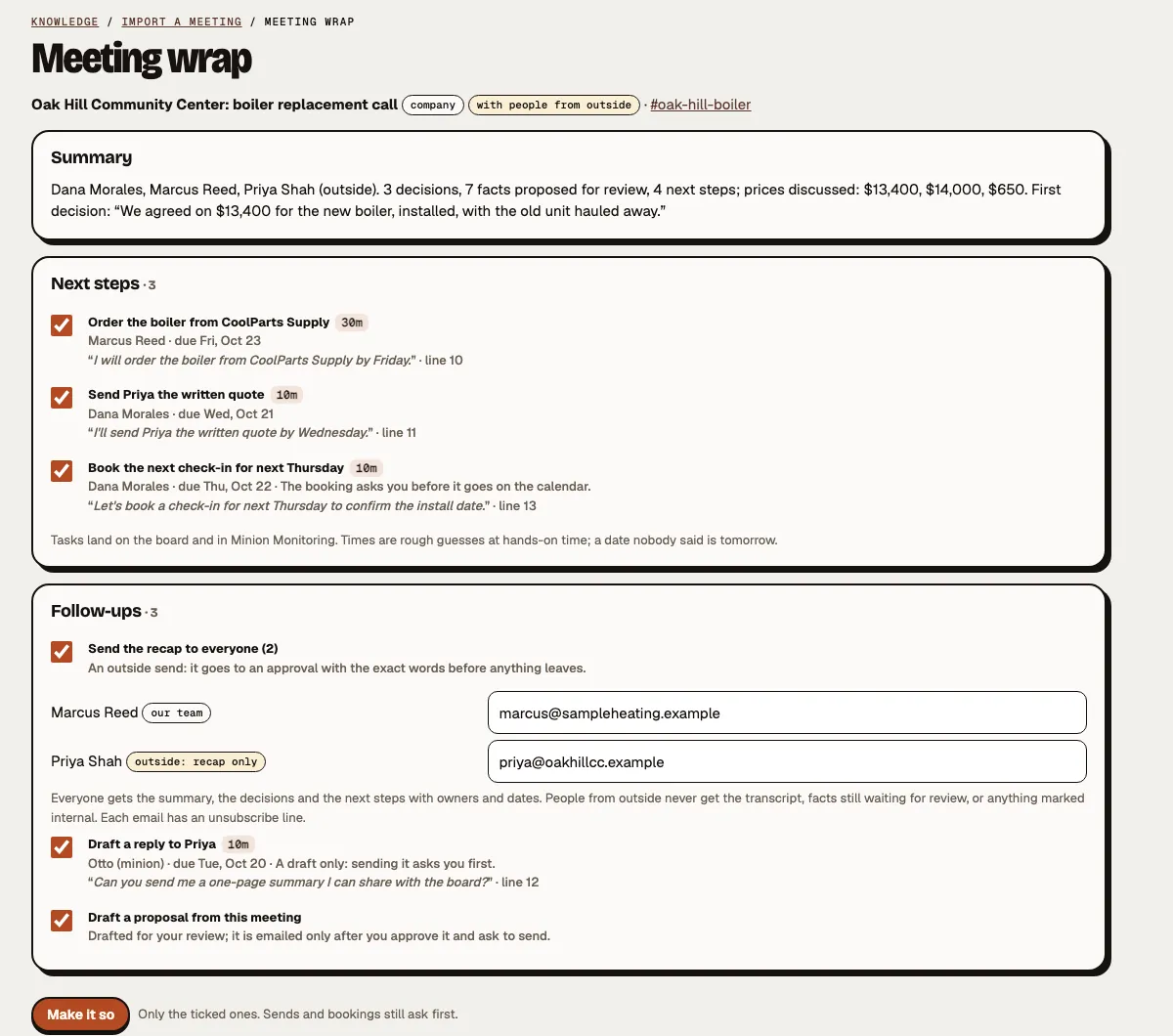
The details
More answersHow do I record a meeting?
From Minion Sidekick, our Chrome extension (Minion Recorder), which we install with you during setup: Google Meet, Zoom or Teams in a Chrome tab, with its sound and your mic. It uploads as it records, so a long call doesn't pile up on your laptop. In person? Record the room from your phone. Before the calls on your calendar you get a nudge: "Record this meeting?"
Can a minion join the call for me?
Yes, with Send a Minion, part of every plan. Otto joins your Google Meet and Teams calls from your calendar as an AI notetaker. He announces himself, never speaks, shares a screen or clicks anything. The host may need to let him in, and if a meeting won't let a notetaker in, record from Chrome instead in one tap. For Zoom, record the tab from Chrome or bring in the cloud recording.
Can I bring in a meeting I already have?
Paste a transcript, upload a recording or a file (.txt, .vtt, .srt, .docx), pick a Teams or Meet transcript or a Zoom cloud recording, or paste a video link. Already use another notetaker? Bring its meetings in by connection, a forwarded recap email, or upload.
Import a meeting sits on Today, under the chat box, on every project and client channel, and in the phone menu. Start from a project's channel and the meeting is filed with it.
Who gets the recap?
One approval lists every recipient and both versions of the email, and nothing goes until you say yes. Your team gets the summary, what was agreed, the next steps and the facts to check. People from outside get the recap only: never the transcript, facts still waiting for review, or a line marked internal like "between us". It's sent from your business mailbox when it's connected.
Can I search my meetings?
Yes. Each meeting gets a page with its transcript, speakers and times, its summary and its Wrap. Search every meeting you're allowed to see, or ask a question and get an answer that cites the meeting and the moment it came from. Who sees a meeting is chosen first, before anything is read: only you, a team, or the whole company. Share only an approved summary of a private meeting, never the whole transcript.
How does consent work?
- Before every recording you confirm that everyone knows it's being recorded and that no one under 18 is. No box ticked, no recording.
- The notetaker names itself as an AI notetaker under your name, and we give you the line to say or paste. A notetaker never records until a person has confirmed.
- Easy to stop: anyone on your team can take the notetaker out from Minion Monitoring, and Pause everyone takes every notetaker out of its meeting.
- Only a person starts one. No minion can start a recording on its own.
How does it know who said what?
With Send a Minion, names come from the call. With the recorder, it's you plus everyone else, with names suggested from your calendar and a one-tap fix.
Do you keep voiceprints?
No. We never build or store a voice pattern of anyone.
Is it extra?
No. Minion Minutes is included in every plan, with 10 meeting hours a month on Starter and 30 on Team and on every client workspace. Send a Minion comes with it. How meeting hours work.
Your next meeting, wrapped.
Tell us about the meetings you run and the follow-ups that slip. We'll show you how the Wrap would handle them.
Or see pricing: included in every plan.