Give them a task. They get it done.
Sample replies
Missed calls, quotes nobody chased, a website nobody's touched in two years. Your minions do the work. You say yes over coffee.


Answers your calls and writes back to new leads
Someone calls at 7pm. Someone fills in your form at 11. Your minions are on both.
- Nell · Front desk
Answers your calls day and night
She says she's an AI, offers open times, and holds the slot for two hours while you confirm.
- Leads
Writes back to new enquiries from your website and messages
The chat on your site answers on the spot, from facts you've cleared for the public. Replies to forms and social messages are drafted in your voice.

- Miles · Follow-ups Asks first
Follows up your quotes before they go cold
Miles writes the follow-ups, reminders and welcome emails. Switch on the ones you want, and they stop when the customer writes back.
- Pipeline
Tracks your leads from first enquiry to won job
Your minions move a card only when something real happens, like a reply or a booking, and say what it was.
See all 23 call and lead features
- Miles · Marketing
Leads and customers
Leads from every source on one page, one record per customer, review requests and a monthly win-back list.
- Wes · Website
Website lead form
One line on your website adds a contact form; every enquiry lands in Leads with a task for the team.
- Cora · Content
Website chat
A chat on your website that answers only from what you marked OK for the public. Part of your plan.
- Ivy · Inbox
WhatsApp, Messenger and Instagram
Customer messages in one inbox, with replies drafted from approved knowledge that wait for your yes.
- Ivy · Inbox
Email
Minions search your mailbox, sort it and draft replies; every email to a customer waits for your yes.
- Nell · Front desk
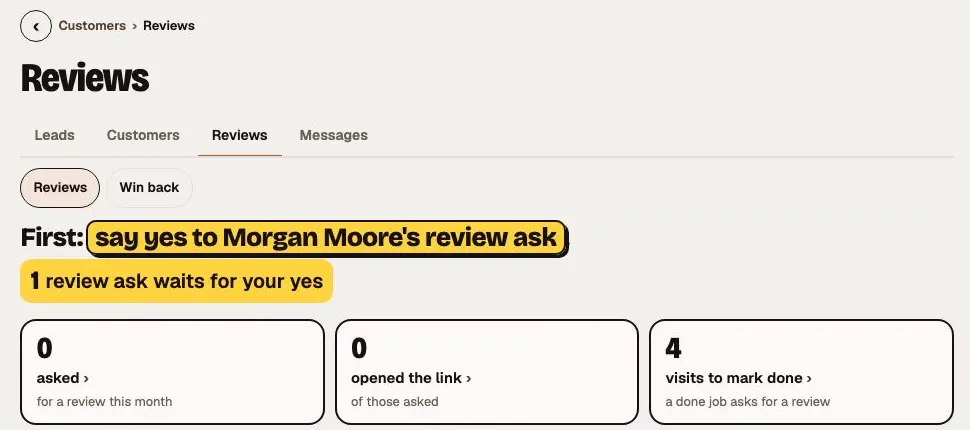
Review asks
When a job is done, a review ask is drafted for the customer and waits for your yes.
Sample workspace A real screen from the app, with sample data. - Miles · Marketing
Win back
Customers who have gone quiet get a friendly check-in, drafted for your yes.
- Otto · Operations
Service due
See which customers are due for their next visit, so nobody slips through.
- Miles · Marketing
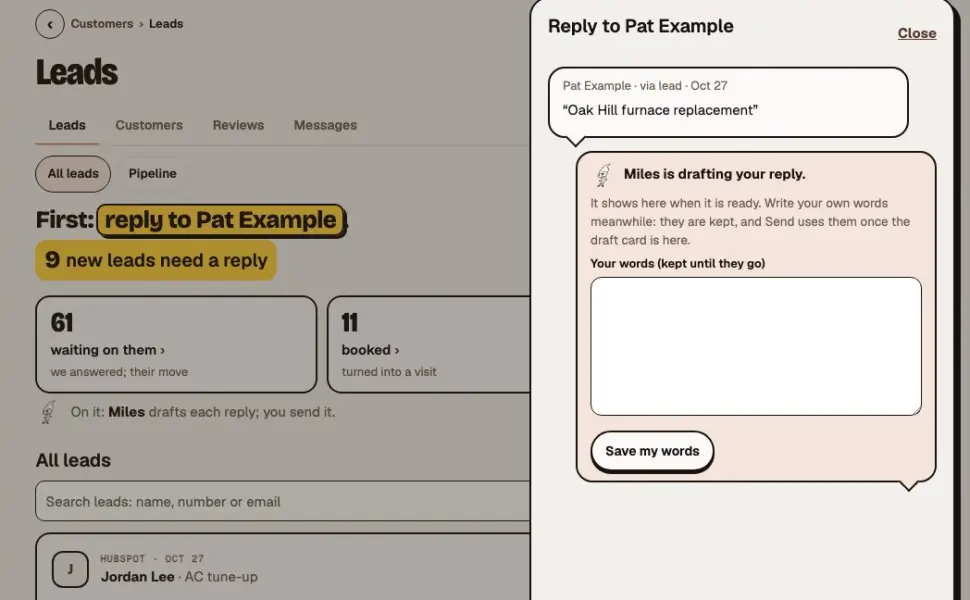
Reply in place
Tap Reply on a new lead and the reply opens right there: Miles drafts it, your own words are kept, and nothing sends without you.
Sample workspace A real screen from the app, with sample data. - Miles · Marketing
One voice per customer
Each customer conversation has one minion who answers it, so nobody hears from three minions about one thing. Complaints and refunds come to you.
- Miles · Marketing
Flows
Ready-made follow-ups that run on a timer: welcome emails, reminders and review asks. Miles writes them, and each one is off until you turn it on.
- Miles · Marketing
Your own flows, step by step
Build a flow day by day, with if/then rules: if they reply, the flow stops. Every send still waits for your yes.
- Miles · Marketing
Who's where
See everyone in a flow by step: who is coming up, who is waiting for your yes, and who stopped and why.
- Miles · Marketing
Flow results
How each flow is doing from your own records, and version A against version B with the next thing to try.
- Miles · Marketing
Keep your email tool
Keep Kit or Mailchimp, or run your flows here. Either way the minions draft, you approve, and unsubscribes stay in step both ways.
- Reviewer · Checks
Nothing unconfirmed goes out
A message with anything still marked "to confirm" is held until someone fixes it.
- Miles · Marketing
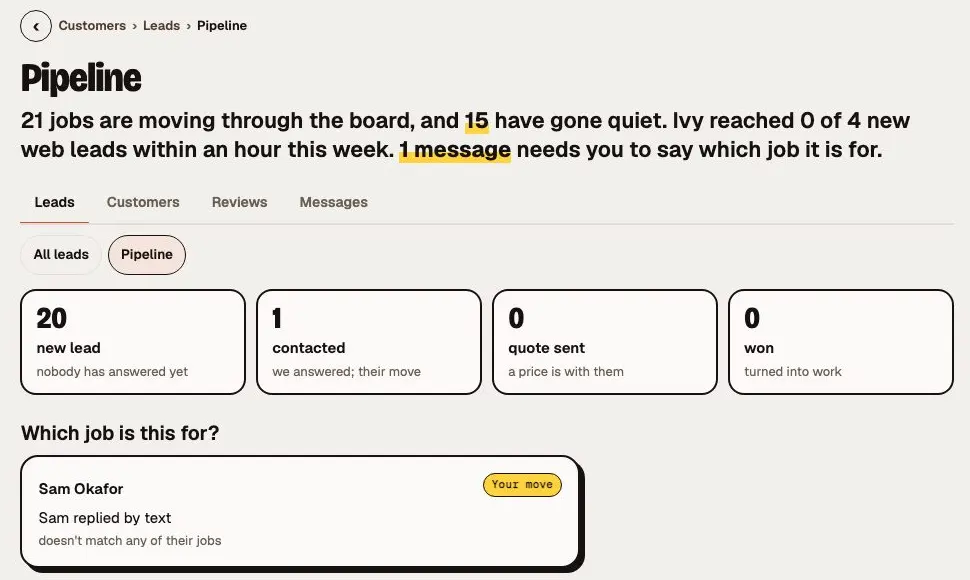
Pipeline
Every job on one board that moves only on real evidence, like a reply or a booking, never on a guess.
Sample workspace A real screen from the app, with sample data. - Miles · Marketing
Which job is this for?
When a reply could belong to more than one job, the team asks you instead of guessing.
- Otto · Operations
What your team did
What your team did and what it was worth, month by month from your own records, next to your North Star.
- Miles · Marketing
The new pipeline board
Columns from New lead to Won, each card with its next step; a new lead gets its first reply drafted and its follow-up ready to start.
- Nell · Front desk
Nell, the front desk (in every plan)
Answers your phone day or night, says she is an AI, and honours every opt-out.
- Nell · Front desk
Checked before she speaks
Every sentence Nell says on a call is checked against your facts before she says it.
- Nell · Front desk
Text sign-ups
Customers sign up for your texts on a page you can link anywhere; every yes is kept with the exact words they agreed to, and STOP always works.






Leads

Phone · Nell
Took a call at 9:14 PMMaria wants Thu 9 AM · furnace check · held for youWeb form · Sam Lee · reply drafted
Hi Sam, thanks for asking about a furnace check. We have Thursday at 2 PM or Friday at 10 AM. Which suits you?
SendEdit
Chases what you're owed and tracks what you owe
Late invoices get a friendly reminder. Bills come out of the inbox and onto one list.
- Bea · Invoices Asks first
Chases late invoices with a friendly reminder
Bea finds what's overdue in your books and drafts the reminder, with the invoice number and amount.
- Bea · Bills
Files your bills with their due dates
Send her the email, the PDF or a photo. Bea reads the bill, finds the due date and flags anything missing. Nothing here ever pays a bill.
See all 4 money features
- Bea · Bookkeeping
Bills
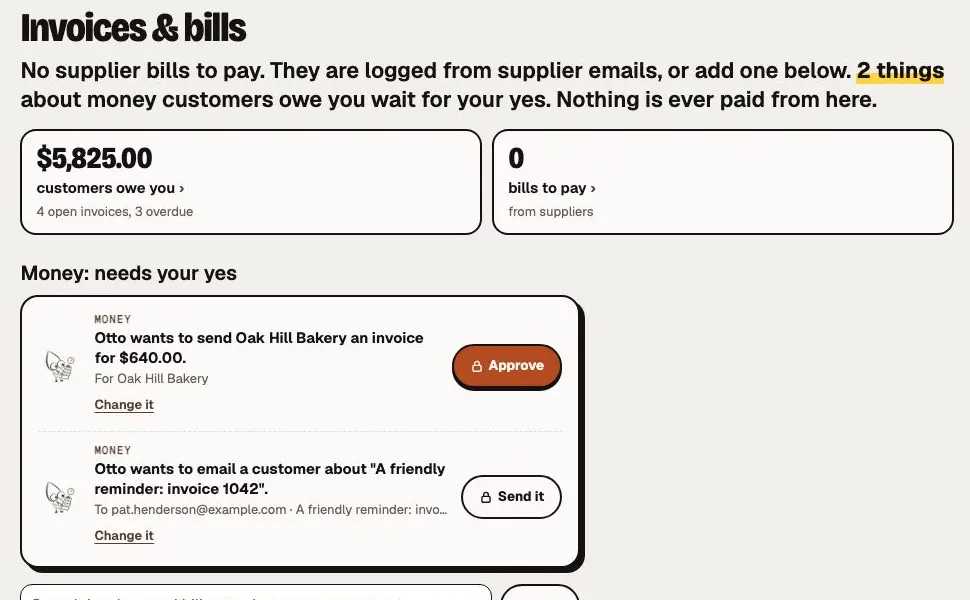
Supplier bills read from an email, a PDF or a photo and kept with their due dates. Nothing here ever pays a bill.
- Bea · Bookkeeping
Invoices and bills in one place
Who owes you and what you owe, side by side, with one search across both, Chase on an overdue invoice and I paid it on a bill.
Sample workspace A real screen from the app, with sample data. - Bea · Bookkeeping
One monthly bill
One plan a month with the team's work included, and a setup fee once.
- Bea · Bookkeeping
Spend limits
A monthly cap you set that warns at 80% and can stop paid work at 100%, and "ask me before any job over $X".

Late invoices
| Customer | Amount | Late |
|---|---|---|
| Oak Hill Bakery #1057 | $1,240 | 34 days |
| Lakeview Florist #1061 | $980 | 41 days |
| The Patels #1064 | $1,460 | 31 days |
| Riverside Dental #1066 | $500 | 36 days |
 Bea drafted 4 friendly remindersSend reminders
Writes your pages, asks for reviews, watches your ads
A page for the service people keep asking about. A review ask when the job is done. A Monday note when an ad starts wasting money.
- Wes · Website
Writes new pages for your website
Drafted from what your business really does, in your voice. Nothing goes live until you approve it.
- Nell · Reviews Asks first
Asks for a review when a job is done
When a job is marked done, Nell drafts the ask. Every customer gets the same ask, and never more than once in 90 days.
- Pip · Google Ads Specialist
Watches your ad spend and flags the waste
A report every Monday from your real numbers. When an ad burns money, Pip says so and suggests the fix; you make it in Google Ads. Store ads he drafts stay paused until you launch them.
 Pip · Google Ads Specialist SampleYou didn't ask, but I noticed… 'Fall Tune-up' spent $410 this week, up 60% from $255, with no conversions.

- Mira · Design
Designs your flyers, social posts and ad images
Three looks to pick from, each with its checks beside it: your colours, your fonts, your facts.
See all 7 marketing features
- Pip · Google Ads Specialist
Pip, ads
A weekly Google and Meta ads report from the real numbers, with ideas. In Google Ads, you make the changes.
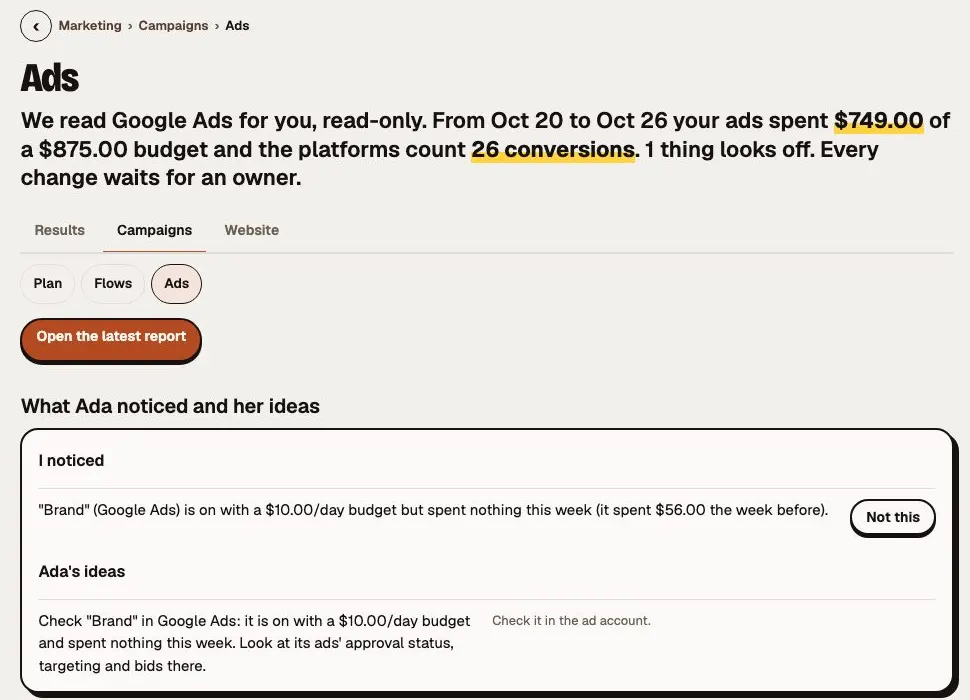
Sample workspace A real screen from the app, with sample data. - Mira · Design
Mira, the Design minion
Flyers, ads, social graphics, email templates and decks: three looks, on brand, checked before you see them.
- Iris · Images
Creative studio
Images and short videos in your brand, sized for Reels, TikTok, Shorts and Stories.
- Wes · Website
Your website
Cora and Wes build and edit your website from your Minion Mind; publishing waits for the owner.
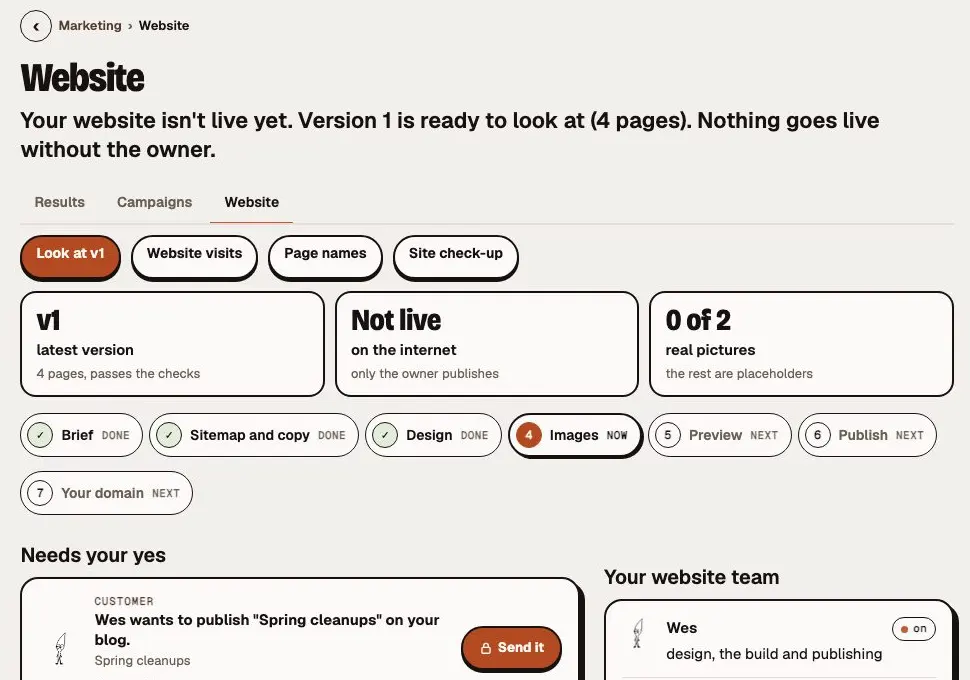
Sample workspace A real screen from the app, with sample data. - Wes · Website
Scripts on your site
Ask Wes to add Google Analytics, an ad pixel or a chat widget: you see the exact code and say yes first.
- Cora · Content
Content plan and monthly report
A 12-month content calendar you approve, and a monthly report on visits, searches and leads.
- Researcher
Analytics
Minions read your Google Analytics and Search Console, read only, for the report and SEO work.




Draft · your OKApprove
Google · “furnace repair cedar hollow”
- 1Rival Heating Co.
- 2You up from 7
- 3Rival Air & Heat
Takes your tasks and works on your goals
Say what you want in plain words. They plan it, do it, and come back with what got done.
- Chat
Takes your tasks by message or voice note
Message them like you'd message your office manager. Approvals come back as buttons, in the app or your team chat.

- Goals
Takes on a goal and tracks it every day
Pick one, like more reviews or getting paid faster. A minion checks the number each day and brings ideas each Monday. Nothing changes until you say yes.
 Otto · Goals SampleOnly 2 of 9 finished jobs got a review request. Want a goal for that?
- Morning brief
Tells you in the morning what got done and what needs you
- All work
Shows which jobs are working, stuck or waiting on you
Anything stuck says why, who has to act, and what moves it.
Want one yourself? Take over and the minion steps back. Hand it back and it carries on.
See all 49 task, chat and work features
- Your minions
Today
Your day at a glance: what came in, what got done and what waits for your yes, with up to five things worth doing this week.
- Your minions
The morning brief
What got done, what is blocked and what each blocked thing needs, what waits on you, and one next step.
- Your minions
Talk to your minions
Ask once and the team splits it into tasks for the right minion, then brings back only what needs you.
- Your minions
Plan first
See the plan and who does what before anything starts. Nothing runs until you press Start.
- Your minions
Needs you
One list of everything waiting on you, most urgent first: read the draft, edit it, say yes or no.
- Your minions
Approve and it's done
Approve, Start and your first setup job answer at once; the minion carries on in the background.
- Otto · Operations
Projects
Group the work by client or project and see where each one stands, with the minion on it.
- Otto · Operations
All work
Every task in one list: what needs you, what is working, what is stuck and what got done this week, each with one button.
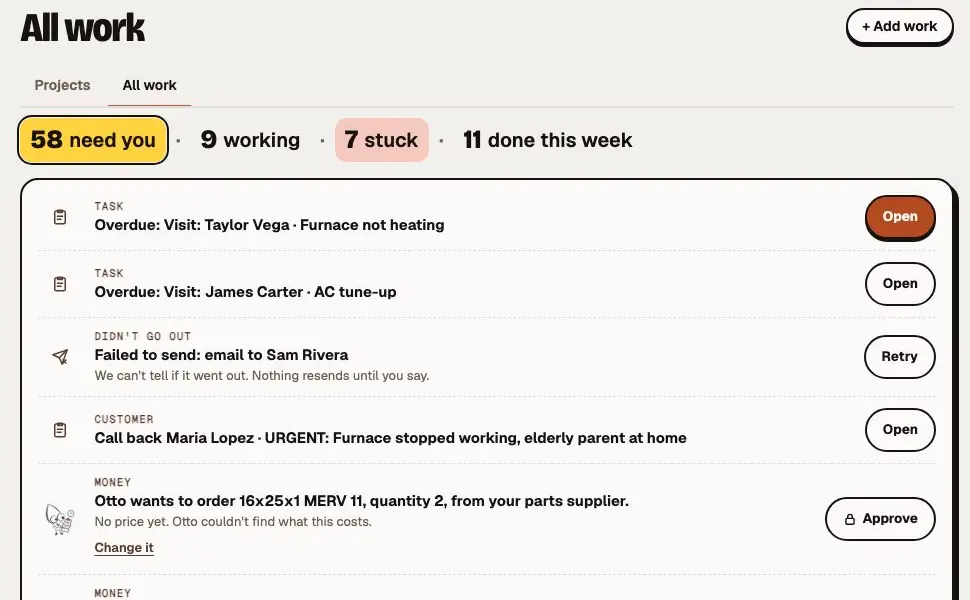
Sample workspace A real screen from the app, with sample data. - Cora · Content
Team
See who's doing what right now and who is free, and take over any job with one tap, then hand it back.
- Your team
One card per big job
A big job is one card that updates in place: what needs you, what is stuck, what is done.
- Your team
Turn a thread into a task
Any message becomes a task a person owns, linked back, and it closes itself when done.
- Your team
Nothing gets silently stuck
Everything not moving, with why, who must act and the one action that unsticks it.
- Your team
Minion Monitoring
Every conversation and task on one board: waiting on you, working, stalled, scheduled and done today.
- Your team
Minion Missions
Missions in plain words, monitors that speak only when something becomes true, and routines on a schedule.
- Your team
Keep an eye on…
Type "customers who haven't paid in 30 days" and get a list that keeps itself up to date.
- Your team
Check-ins
A morning check-in to say yes to in one go, and project check-ins that post only when something changed.
- Your team
Check-in tasks for your minions
Your morning check-in can hand tasks to your minions: they do what they can and bring it back for your OK. Add a note with the mic.
- Your team
Midnight Minions
The overnight shift: a checked backup first, then due missions and your morning prep, in a "While you slept" section.
- Your minions
Question cards
A minion asks with fixed answers; tap one in the app, Slack or email and it carries on.
- Your minions
Pause everyone
One switch stops every minion, mission and notetaker at once, and Resume brings back exactly the ones it paused.
- Your minions
Your team's AI lineup
Each minion starts on the best AI for its job, with a backup from another AI company. Pick a different one by hand and it stays.
- Your minions
Backup AI, by itself
If one AI has a bad day, your team switches to its backup by itself and tells you once, then switches back when it is healthy.
- Your minions
We already have that
Ask for anything we already do and your minions point you straight to it, with who switches it on.
- Your minions
Search, menus and a phone app
One search box for every page, record and question, a menu in the order of your day, and an installable phone app with alerts.
- Iris · Images
Show & Tell
Minions show their work: page previews, word diffs, charts, documents and image sets. React to teach them.
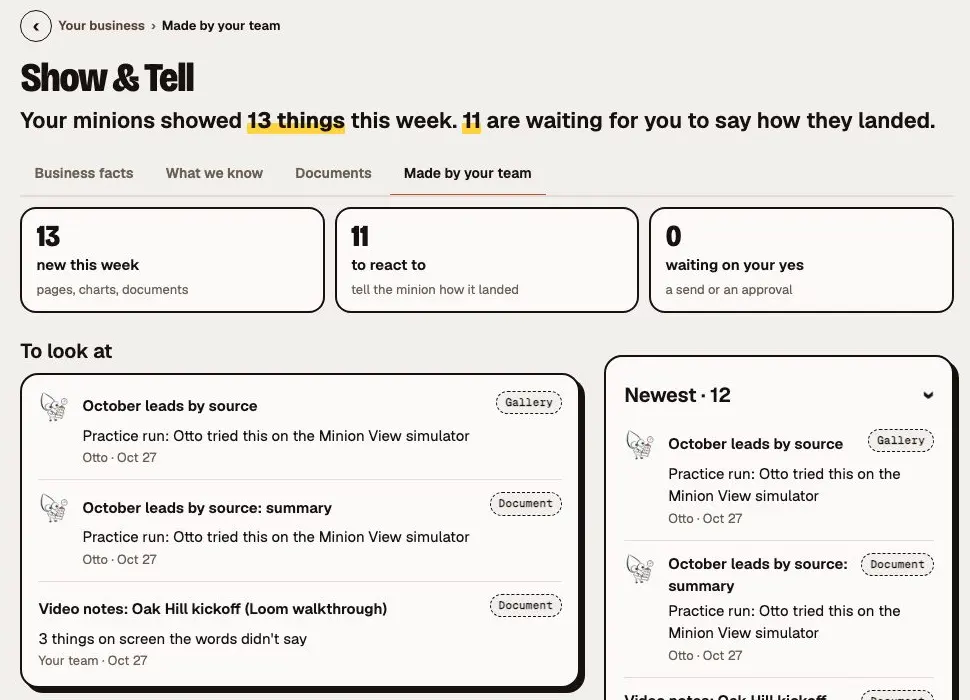
Sample workspace A real screen from the app, with sample data. - Cora · Content
Proposals from a meeting
A proposal drafted from your meeting notes, ready for you to check and send.
- Your minions
Instant chat
Your message shows the moment you press Send, a minion's reply appears as it's written, and minions answer first, in fewer words.
- Cora · Content
Team channels and threads
People and minions talk in channels and threads, with drafts that follow you, Send later and Undo.
- Cora · Content
Bring in a teammate
Add a colleague to a minion chat; the minion then uses only what everyone there may see.
- Your minions
Call your minions
Call from your verified phone, say your PIN, and hand work to your minions by voice.
- Your team
Minion Minutes
Record, import or link a meeting and get a recap, action items for the team and a searchable library.
- Otto · Operations
Send a Minion
Otto joins your Meet or Teams call as a named notetaker that never speaks. Part of your plan.
- Cal · Scheduling
Calendar and booking
Minions see when you are busy and offer real open times; booking is its own switch.
- Cora · Content
See your team live
See who's around, who's typing and what each minion is working on, the moment it happens.
- Cal · Scheduling
Meeting invites
Invites that land in every calendar, with Yes, Maybe or No, reminders, and changes that follow through.
- Cora · Content
Chat shortcuts
Type / for a menu of things to do, or @ to pick a minion or a teammate, right where you are typing.
- Otto · Operations
Minion View
The minions' own cloud browser and computer, never on your machine. Watch them work live and take over.
- Otto · Operations
Approve the task once
Say yes once to a task; sending, paying, deleting or submitting still asks.
- Otto · Operations
A sealed computer per job
Minions run code, crunch spreadsheets, make charts and files in a sealed cloud computer for each job.
- Otto · Operations
Minion Sidekick
A Chrome extension: minions work in your own browser and the folders you allow, and can record a meeting tab.
- Wes · Website
Hundreds more apps
More apps connect through official connections or your own account; they start read-only, and money and deletes need an owner.
- Wes · Website
Business tools
Minions read your books, CRM and Zoom recordings and save WordPress drafts; invoices, CRM changes and publishing ask a person.
- Dex · Engineer
Dex, engineer
Explains your code, reviews pull requests and fixes bugs with a failing test first. A person always merges.







Thursday, 7:30 AM

Asks before money, public posts and first contact
Your minions do the work. The big calls stay yours.
- Approvals
Locks the big approvals behind your own PIN
Every send leaves a receipt.
- Pause everyone
Pauses your whole team with one switch
Keep Nell taking messages if you like. Nothing goes out until you resume.
- Privacy
Shows each person their part of the business, and nothing past it
Owners can export the business's records and handle a customer's request to be forgotten.
See all 23 safety features
- Reviewer · Checks
Every job checked, Minion Mode always on
Every job a customer or the public will see is checked before you see it. Minion Mode is always on: your minions know when to work harder.
- Reviewer · Checks
The Minion-approved stamp
A draft that passed its checks carries a small stamp; one that did not gets a Hold up! card with Fix it for me.
- Reviewer · Checks
Sounds like a person, says only what is true
Stock phrases come out, and unbacked boasts, statistics and guarantees cannot be approved.
- Reviewer · Checks
Ask first or Auto
Each tool for each minion is Off, Ask first or Auto, and sends always ask unless you change it.
- Reviewer · Checks
Allow once, Allow always, Always ask
Decide per kind of action whether the team asks every time or just once.
- Reviewer · Checks
The approval PIN
Set a PIN and it guards money, first contact with a customer, legal wording and public posts.
- Reviewer · Checks
10 seconds to cancel
An approved text, call or email is checked again the moment it leaves, with 10 seconds to cancel it.
- Nell · Front desk
Consent and quiet hours
Consent is checked before anything goes out, and calls and texts go only between 8 am and 9 pm where the customer is. When we can't tell, it waits.
- Reviewer · Checks
Every send has a receipt
Every email, text or message your team sends gets a receipt: sent, delivered, or not, on the record.
- Reviewer · Checks
Failed sends come back to you
A send that didn't go through comes back as a card for a person, never lost and never retried behind your back.
- Your minions
A backup approver when you're away
Say "I'm away" and name who says yes while you're out; everything still waits for a person.
- Your minions
Approve what can go together
Approve a set of safe drafts in one go; anything that spends, orders or acts outside still gets its own look.
- Reviewer · Checks
Checks on routines
Every run of a recurring job gets Pass, Flag or Notify with the evidence quoted; two flags pause it.
- Reviewer · Checks
Practice mode
Try the whole team with nothing sent, bought or published, and the app says so on every practice draft.
- Reviewer · Checks
Company rules
Business-wide rules for what asks first, with locks no minion setting can loosen.
- Reviewer · Checks
Forget a customer, export everything
Forget a customer everywhere, export the whole business, and set how long each kind of data is kept.
- Reviewer · Checks
A log you can check
Every important change, and every outside visit to your workspace, is written to a chained log the owner can check.
- Reviewer · Checks
Fenced in
Pages run only our own scripts, and a minion that read outside or private content can't send it to someone else's server.
- Your team
Updates never lose work
If we update while a minion is working, it pauses at a safe point and picks up where it left off, with nothing sent twice.
- Your team
Updates between jobs
We update your team only when nothing is part way: no job working, no live call, no send going out.
- Reviewer · Checks
Safer sign-in links
Sign-in and invite links are stored scrambled and expire sooner.
- Your minions
A backup AI for an outage, if you want one
Pick another AI company to carry on your private work if the main one is down. Off unless you choose it.
What asks you first
- Spend moneyAsks you
- Post in publicAsks you
- Contact someone newAsks you
Learns your prices, your voice and new jobs
Your facts live in one place. The whole team works from them.
- Minion Mind
Remembers your prices, hours and the way you talk
Drafts for customers are checked against the facts you've confirmed. Change a price, and anything drafted with the old one gets flagged.
- Skills
Learns new jobs from ready-made skills and from work you've approved
A new skill is checked before it joins the team.
- Research
Answers your questions, with sources you can check
Ask about a permit rule, a supplier or a new service. You get the answer and the links.
See all 23 memory, skill and research features
- Researcher
Research that keeps going
Research keeps working if one AI company is down, and says so plainly when no search works.
- Researcher
Web search for every minion
Every minion can search the web, with the sources on every answer.
- Researcher
Reports you can hand on
Deep research comes back as a report: the headline finding first, and every section with its sources.
- Your team
Official skills
Recipe cards for your minions, each passing its own test cases before an owner or admin switches it on.
- Your team
The Skill library
One tap on Turn on puts a skill on exactly the minions it is made for, and updates come with 7 days of Undo.
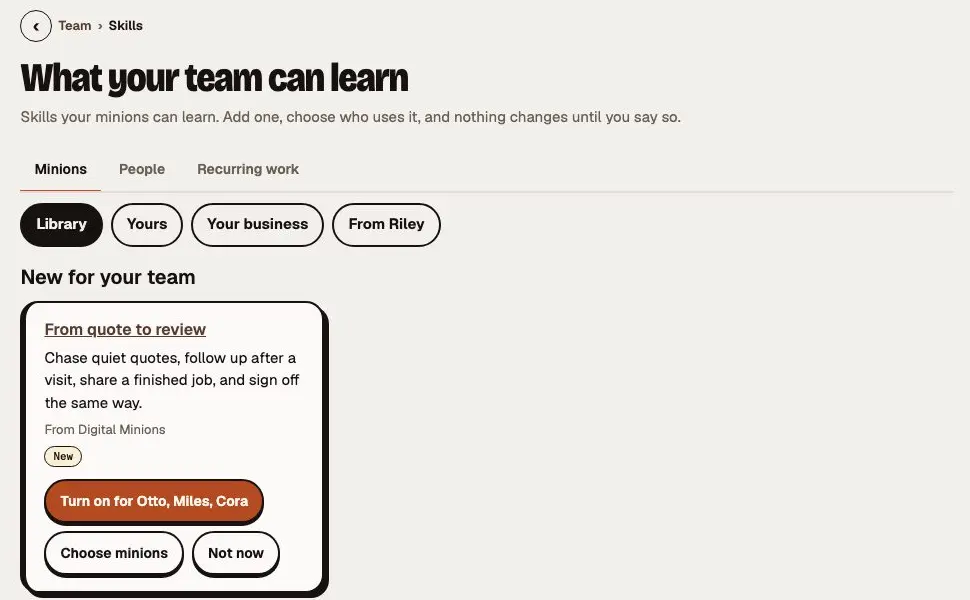
Sample workspace A real screen from the app, with sample data. - Your team
Build me a skill
Ask for a skill in plain words, with an example, and it is built for your approval.
- Your team
Templates and Learn
Official templates that install as drafts, short lessons with "Do it now", and Build it for me.
- Your team
Add your own skills and plugins
Upload a skill or connect a plugin: it is checked before it joins, runs a practice round first, and a new version waits for your yes.
- Your team
Agency-tested skills
Ads, landing pages, email, SEO and LinkedIn skills from an agency that runs them every day, as one skill pack.
- Researcher
Minion Mind
Your business brain of prices, policies, how-tos and style. Teach it once and every minion knows.
- Cora · Content
Business facts
Your prices, services, hours and approved wording, confirmed by you, and every draft is checked against them.
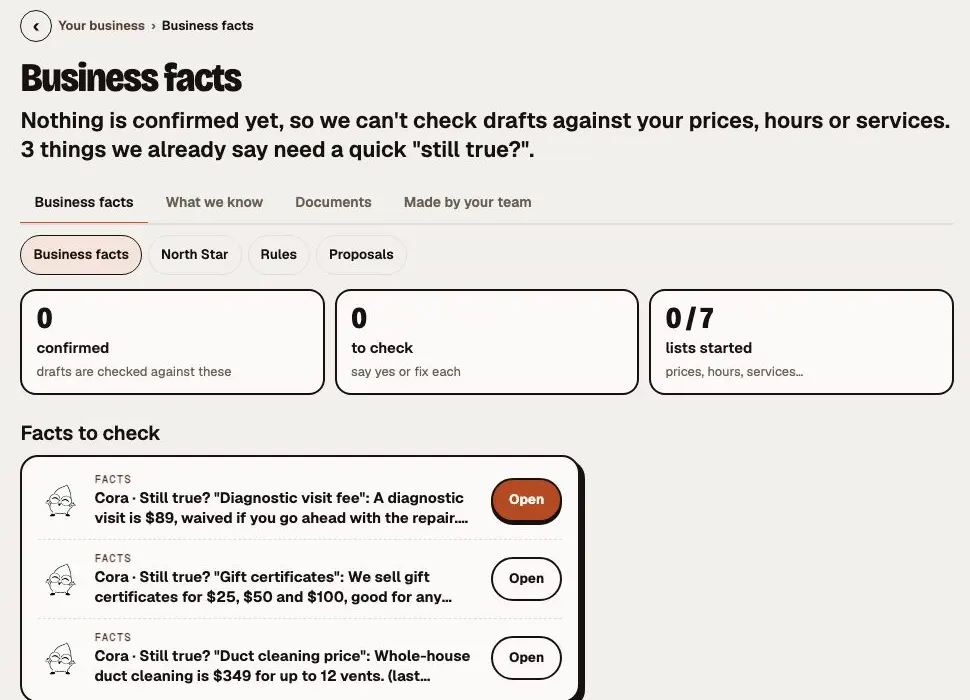
Sample workspace A real screen from the app, with sample data. - Researcher
What we remember
See what the team remembers about each customer, fix who it is for, or forget it.
- Iris · Images
Memories
The parts of your Minion Mind, the Brand memory first, that each minion reads before it works.
- Mira · Design
Brand memory
Teach your brand once, from your website or a brand guide, and every post, ad and reply follows it.
- Miles · Marketing
Minion Memory
Correct a minion once and the team remembers, after an owner or admin approves the rule.
- Miles · Marketing
Coach your minion
Play a customer, give plain-English feedback, and accept a change section by section; locked sections stay put.
- Your team
Minion Musings
Things your minions noticed in your real records, rare and private, and you decide what to do.
- Your team
Suggestions
When the team can count real friction, like a job blocked for want of a connection, it says so once, with one tap to act.
- Cora · Content
How we talk to you
Thirteen tones, a voice for your clients, and minions that learn how you write.
- Cora · Content
Get to know you
A short interview teaches the team who you are, and each person keeps a private space nobody else reads.
- Researcher
Find it by meaning
Ask in your own words and the team finds the right note, file or customer by what it means, not just matching words.
- Reviewer · Checks
Forgotten stays forgotten
Forget a detail and it stays forgotten, even if the same file is added again later.


Minion Mind
- Furnace tune-up
- $129
- Hours
- Mon–Sat, 7 AM–6 PM
- How you talk
- Says “folks”, not “customers”
- Service area
- North and east side, 30 miles Corrected by you · Oct 3
Sets up your minions with you, step by step
Tell them what you're trying to do. They read it back, and start when you say Looks right.
Run an agency? Minion HQ opens every linked client from one sign-in, with what's waiting, stalled and due.
See all 15 setup and agency features
- Your minions
Tell us what you're trying to do
Say it in your own words; your minions read it back as a plan, and nothing starts until you say Looks right.
- Your minions
Say yes by phone
Only your own plain yes, on your verified phone, right after a full read-back, starts the drafts.
- Your minions
Your team's first drafts
Say Looks right and your team starts drafting; nothing goes to a customer until you OK it, and one tap undoes it.
- Cora · Content
Pick your team
Start from a prebuilt team and pick who fits your plan, each with its own yes.
- Cora · Content
Invite your team
Invite people one at a time, with a role already picked and a plain line on what it can do.
- Reviewer · Checks
Support that never decides
Digital Minions support can help for a time the owner picks, and never decides.
- Reviewer · Checks
Single sign-on for larger teams
Require your own single sign-on, add and remove people from your identity provider, and hand over work when someone leaves.
- Reviewer · Checks
Your own Home Base
Each business gets its own Home Base: its own database, team, Minion Mind and channels, never mixed with another.
- Researcher
Minion HQ
One sign-in for coaches and agencies: a card per client with what is waiting, stalled and due.
- Your team
Team skills from your agency
Your agency builds a great skill once, and every client gets it with one tap.
- Reviewer · Checks
Coaches prepare, never decide
A coach can see and prepare everything, and decides only if the owner says so.
- Nell · Front desk
Extra calls, always your yes
When Nell's included minutes run out, on any plan or pooled across your clients, extra use waits for your yes before it is billed.
Getting set up
- Connect your mailGmail · connected
- Add your prices12 services added
- Your first taskBea drafted 4 invoice remindersApprove
Hand your first job to a minion.
Book a call. Tell us the job that eats your week, and we'll show you the minion who takes it.